For the first time in over a decade, how I develop software has fundamentally changed.
I realized recently that I’m no longer evolving the code directly.
Instead, I’m designing the environment in which the code evolves.
Software development becomes designing the evolutionary environment instead of manually evolving the code.
AI has made the cost of certain parts of development collapse, which has entirely changed the game. Below I describe how I used to work, what changed, why and how I now move 10x faster. By considering software development as Guided Evolution I think it may unlock insights to accelerate your programming.
Look at the little green circle in the diagram below, that was me iterating on one part of the problem.
The ability to produce great code historically required me to conceptually understand code end-to-end:
- Understand the code base.
- Add some functionality at the edge of the area I want.
- Run it.
- Evaluate if the change was good. If not, start again.
- Repeat this loop over weeks and months, with occasional large refactors when I had a better idea.

Software development has always been a process of moving through a multi-dimensional solution space, gradually working toward a better system. When you think of it like that, it resembles the diagram above. However, now we are no longer iterating on a single node, we now set the framework within which the evolution occurs.
What the diagram represents
- Ideally setting a very clear measurable goal. (Green Flag in image)
- Lower Guard Rails – Linting , Tests, Instructions which say what not to do AND preferably automation to enforce it.
- Upper Guard Rails – Measures to aim for, concise code, non-duplicated, dictated trade-offs, performance requirements.
- Green Circle – Controlling the evaluation at each step. Carefully choose what information the build emits.
Why AI changes everything
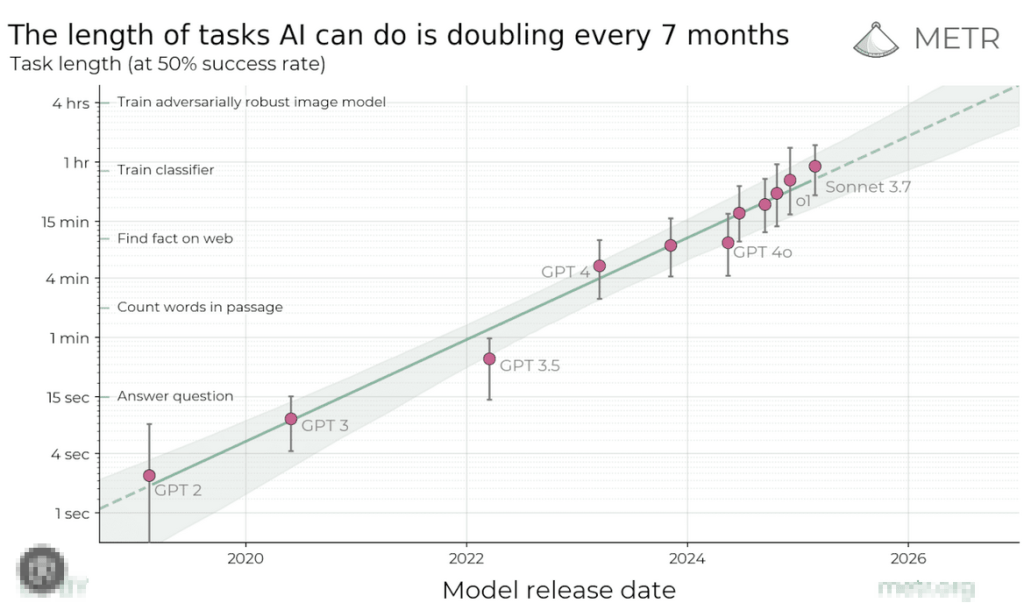
- AI has plummeted the cost of trying different branches
(Try lots of proof of concepts 1-shot and then evaluate a few for usefulness.) - AI can progress along 10-20 steps within 40 minutes.
- If we can set a clear success criteria and a measure of fitness at each step,
AI can progress steadily and relentlessly (like evolution) without much oversight.
Thinking about AI development through this lens explains several surprising behaviors. For example, AI can sometimes build large systems like compilers, yet struggle with small refactors. This makes sense if we view it as an evolutionary system: AI is good at exploring large solution spaces, but less reliable at precise local edits within complex constraints.
This perspective has given me several promising ideas for improving what I’m calling my new process:
EDLC – the Evolutionary Development LifeCycle.
Hopefully it will give you ideas too.


 Ryan Hamilton